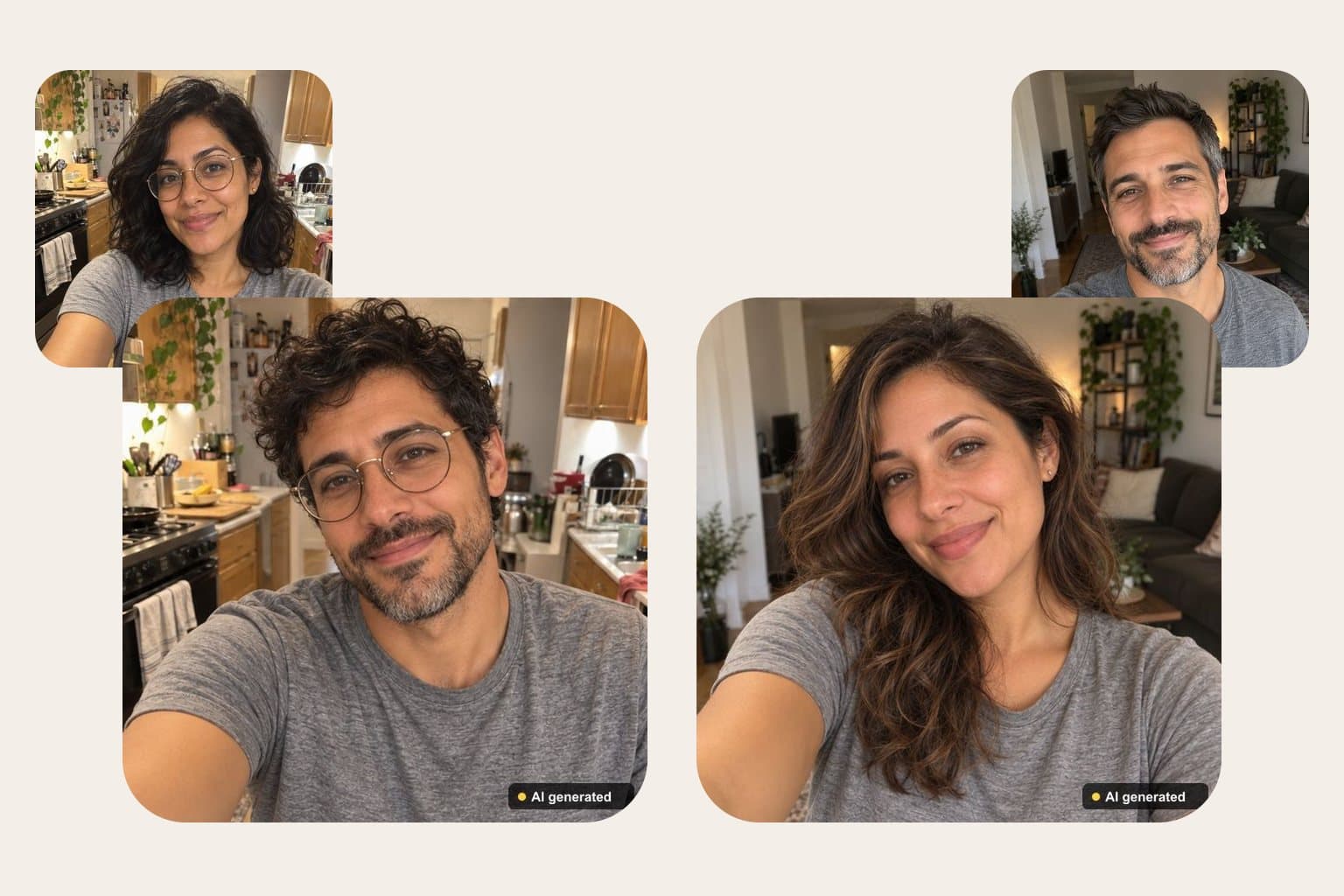





How does gender swap AI work?
Short answer: To see yourself as the opposite gender, upload one clear selfie to FaceTwin. The AI keeps your eyes, smile, skin tone and glasses and changes only hair, facial hair and styling, in about 15 seconds. The first HD result is free with no account; each image is labelled “AI generated” and deleted within 24 hours.
A gender swap AI edits one photo of you to show how you might look as the opposite gender. On FaceTwin you tick the consent box and upload a clear selfie; an AI safety check first refuses photos that may show a minor, any nudity or a recognisable public figure. An image model then keeps what makes you you — eye shape and colour, skin tone, age, expression, smile, glasses and the background — and changes only hair, facial hair, the softness of brow and jaw, and clothing styling. The result takes about 15 seconds. The first HD image is free with no account; after that each is $1.99, or $4.99 for five. Every result carries a visible “AI generated” label and is deleted within 24 hours; your selfie is never stored.
- 1 selfie, about 15 seconds
- Keeps eyes, smile, skin tone and glasses
- First HD free; then $1.99 or 5 for $4.99
- “AI generated” label; deleted within 24 h
More from one selfie
Gender swap your photo in three steps
- Tick the consent box: you are 18+, and it is your photo or the adult in it agreed.
- Upload one clear selfie, facing the camera in soft light — or take one with your phone.
- See yourself as the opposite gender in about 15 seconds. Download it or press Delete now. The first HD result is free.
It works both ways — a man shown as a woman, or a woman shown as a man — and keeps the same pose and background so the before-and-after lines up.
What changes and what stays the same
| Stays the same | Changes |
|---|---|
| Eye shape and colour, skin tone, age | Hair length and style |
| Expression and smile | Facial hair added or removed |
| Glasses and accessories | Softer or stronger brow and jaw |
| Pose, background, light and camera angle | Clothing styling, kept fully clothed |
The model is told never to make you look like a celebrity, never to slim or whiten your face, and to keep the edit tasteful and non-sexual.
Best gender swap AI: what to compare before you upload
Most gender swap apps can add a beard or long hair. The real difference is whether the result still looks like you, or like an attractive stranger with your hair colour. Check these points on any tool, including this one:
| What to check | Why it matters | FaceTwin |
|---|---|---|
| Keeps your identity | Same eyes, skin tone, age and smile — otherwise it is a new face, not you | Eyes, skin tone, age, smile and glasses are locked in the prompt |
| Works both ways | Male to female and female to male should be equally natural | Both directions, same pose and background |
| Free result quality | Many free tiers are small, blurred or watermarked | First result in full HD, free, no account |
| Price after the free try | Subscriptions add up if you only want a few images | $1.99 each or 5 for $4.99, no subscription |
| Safety and labels | A swap of someone else can be misused | Consent tick; minors, nudity and public figures blocked; “AI generated” label |
| What happens to your photo | Your face is biometric data | Selfie never stored; result deleted within 24 hours |
Live camera filters in social apps are great for a quick laugh on video; they redraw you frame by frame and look like a filter. All-in-one photo editors bundle a gender swap among dozens of effects, usually behind an account and credits. A dedicated tool like this one does one edit, in HD, and keeps the face recognisably yours.
How FaceTwin keeps face swaps safe
- Consent first: before you can upload, you confirm you are 18+ and that the photos are yours or everyone in them agreed. Without that tick, nothing is sent.
- Safety check before anything is made: an AI checker looks at each photo first. Photos that may show a child, any nudity, or a recognisable celebrity or politician are refused — and nothing is charged.
- Visible “AI generated” label: it is burned into every face swap and gender swap image before it is saved, including the free one.
- Deleted within 24 hours: your uploads are never stored, and the result is deleted from our storage automatically within 24 hours. You can also press Delete now the moment you’ve downloaded it.
- Report misuse: under every result, and on this page, a Report link reaches us directly. Write to the contact address on the terms page with the link or result ID and we remove it.
What you can and can’t do with it
Swapping faces is fun with your own photos and with friends who said yes. It is harmful when it fakes someone. So the rules are built into the tool, not only written here:
| Allowed | Not allowed (blocked or removed) |
|---|---|
| Your own photos — selfies, trip photos, costume ideas | Photos of someone who didn’t agree, or a stranger from social media |
| Friends and family adults who agreed, for a laugh or a card | Anyone under 18 — the safety check blocks photos that may show a minor |
| Trying a look, a role or a style before a party or a shoot | Celebrities, politicians and other public figures — blocked when detected |
| Memes and creative projects clearly marked as AI | Nudity or sexual content of any kind — blocked |
| Previewing a gender-swapped version of yourself | Fake evidence, scams, impersonation, harassment or bullying |
Every result carries a visible “AI generated” label in the corner. Do not crop it off to pass the image off as a real photo.
Tips for a better gender swap
- Use a recent selfie with your whole face visible and no strong beauty filter — filters blur the features the model keeps.
- Soft window light gives the most natural skin and hair.
- Hair pulled back or short hair gives the model more freedom; long hair is kept partly as a hint.
- Want it as a cartoon instead? Try the anime or 3D avatar right after — same selfie, no second upload.
Privacy: what happens to your photos
Your photos are sent through FaceTwin’s server to the AI image provider only after you tick the consent box, used once in memory to make the swap, and discarded — FaceTwin does not save them and never trains on them. The swapped result is kept in private storage only so you can download it, and is deleted automatically within 24 hours (other FaceTwin images are kept 7 days). Only you, or someone you send the private link to, can open it.
Frequently asked questions
Is the gender swap AI free?
Your first HD gender swap is free, with no account or e-mail, one per browser. After that each image is $1.99, or $4.99 for five — one-time payments, no subscription. If the safety check refuses a photo or the edit fails, nothing is charged.
What is the best gender swap AI?
The best gender swap AI is the one that keeps your eyes, skin tone, age and smile while changing hair, facial hair and styling — so friends still recognise you. Compare the free result (HD or a blurred preview), whether you need an account or subscription, and what happens to your photo. FaceTwin gives one free HD result with no account, keeps your identity, labels the image and deletes it within 24 hours.
Can I do a male to female or female to male swap online for free?
Yes. Upload one selfie here and your first HD gender swap is free, in either direction, with no app to install and no account. It runs in the browser on your phone or computer.
Does it work for both men and women?
Yes. It shows a man as a woman or a woman as a man, keeping the same eyes, smile, skin tone, glasses and background. It is a playful preview, not a prediction of how anyone would look after a real transition.
Can I swap a celebrity’s or a friend’s face?
Not a celebrity, politician or other public figure: the safety check blocks recognisable public figures. A friend only if they are an adult and agreed — you confirm that before uploading, and they can report the image to us for removal. Photos that may show anyone under 18, and any nudity, are always refused.
Why is there an “AI generated” label on my image?
So nobody mistakes a swapped face for a real photo. The small label is burned into every face swap and gender swap result, including paid ones, and cannot be switched off. Please don’t crop it to pass the image off as genuine.
How long do you keep my face swap?
Your uploaded photos are not stored at all. The result is deleted from FaceTwin’s storage automatically within 24 hours, and you can delete it at once with the Delete now button under the result. Download it first if you want to keep it.
Is my photo uploaded?
Not for local lookalikes or face analysis: the model runs in your browser, so your selfie, landmarks and descriptor stay on your device. AI portraits, including the first free one, and full reports send your photo through our server to the AI provider after a free first-portrait request or a credit purchase, and separate upload consent. Reports also send your numeric measurements. FaceTwin does not save the original photo; it is discarded from request memory after processing.
More from the same selfie
Related by topic
Headshots and profile pictures
The data behind the scores: FaceTwin facts · face shape statistics
Last updated 2026-10-18. FaceTwin is for entertainment and is not identity recognition, medical or cosmetic advice.